


Bikemap: Cycling Tracker & GPS
4.2525.00 Reviews
App Specs
- Version
- 21.8.0
- Updated On
- License
- Free
- Downloads
- 5,000,000+
- Developer
- Bikemap GmbH
- Categories
- Maps & Navigation
- Platform
- Android, iOS
Screenshots
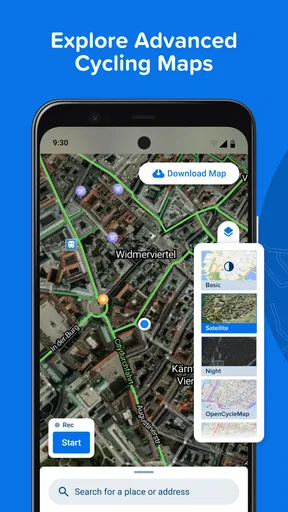

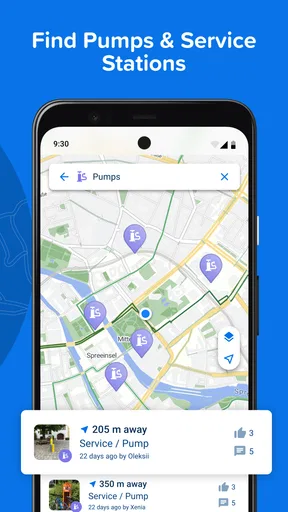
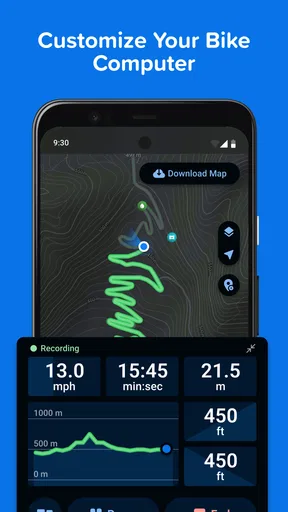
 Analysis by AppCompare
I judge a cycling app less by how many routes it can show me than by whether it helps me choose a sensible ride, follow it without fuss, and get home when plans change. That is the lens I use for Bikemap: Cycling Tracker & GPS. It is a free Maps & Navigation app from Bikemap GmbH, and its main appeal is bringing route discovery and ride planning together in one place.
It suits the rider who wants more than a line on a map: someone comparing nearby options, checking what a route might feel like, and keeping a record of rides. It is less compelling if all you need is a basic map to get from A to B, or if you already have a navigation setup you trust and never look for new cycling routes.
A practical ride-planning routine
I would start with a familiar loop rather than making the first outing an ambitious trip somewhere remote. Search near home, compare a few routes, and check the route details before setting off. That small test helps you learn how the map behaves on your phone and whether the route information suits the kind of cycling you actually do.
For a weekday ride, I might choose a route I already know and use it to get comfortable with tracking and navigation. On a free afternoon, I would browse further afield and use the route information to decide whether a longer outing fits my time and energy. Treating discovery and navigation as separate decisions is useful: an interesting route is not automatically the right route for today.
That is where a collection built around cycling has an advantage over simply asking a general-purpose map for directions. A cycling route is about the experience as well as the destination. Still, I would not assume that any route is suitable just because it appears in an app. My own judgment about traffic, weather, daylight, fitness, and bike type remains part of the plan.
What to check before leaving
Route details are most helpful when I use them to answer practical questions, not just admire a map. Elevation changes can tell me whether a ride is likely to feel demanding; surface information can help me decide whether the route makes sense for my bike. Popularity can be a useful clue when I want a well-traveled option, while a less popular choice may appeal when I am deliberately looking for somewhere different.
I would also prepare for changes in reception before riding somewhere unfamiliar. The app offers offline maps, so downloading the relevant map before leaving is a sensible habit for a route where a mobile connection may be unreliable. It is a precaution, not a substitute for checking the route and knowing where I am going. I would make sure the planned area is available offline rather than waiting until I am already on the road.
Worth Reading Before You Choose

Flipboard Shows What News Apps Must Do Beyond the Feed

Switching to Android Auto Means Rethinking Your Driving Routine

Google Calendar Makes a Crowded Week Easier to Manage

Ludo King Makes the Most of the Minutes Between Plans

Baby Panda World Brings Quick Play to Modern Phones, but Its Game Library Feels Busy

ESPN’s Live Game View Makes Following Close Games Easier
Navigation is most useful when I glance at it while stopped or listen for directions without letting the screen distract me. Voice guidance can reduce the need to keep looking down, but it cannot replace attention to the road, signs, or other people using it. For a complicated junction, I would slow down and verify the turn safely rather than trying to interpret the phone while moving.
Finding a repeatable rhythm
Once I have tried a route, I can use the app differently: not as a constant source of novelty, but as a way to make rides easier to repeat. Keeping a familiar route in mind gives me a useful baseline for how a ride feels, while the tracking tools can help me review distance, speed, elevation gain, and estimated calories. I find that kind of record more useful for spotting broad patterns than for judging a single day’s fitness.
A practical habit is to decide what I want from a ride before opening the route browser. If I have limited time, I can look for a manageable local option; if I want a challenge, I can pay closer attention to elevation and distance. This prevents endless scrolling through possibilities and makes route discovery serve a real plan.
Route comments and ratings can add context that a map alone cannot provide. I would read them for useful clues, then treat them as another rider’s experience rather than a guarantee that conditions will be the same for me. A recent change, temporary obstruction, or difference in riding style can affect whether a route works, so I keep a backup plan when the trip matters.
Where it fits among cycling tools
Compared with a general navigation app, Bikemap is more focused on finding routes made for cycling and considering their riding characteristics. Compared with a fitness tracker, its route discovery and navigation are more central to the experience. That focus makes it attractive when I want to explore; it may be unnecessary if my priority is only recording exercise or following a route I already have elsewhere.
The app also brings social route sharing into the picture. That can be valuable when I want ideas from other cyclists or want to share a ride, but I do not need a social feed to get value from route planning. Riders who prefer a quiet, minimal navigation tool may find those community elements secondary, while people who enjoy learning from local route choices may appreciate them.
Performance figures are best treated as helpful feedback, not a complete picture of training. Tracking can make it easier to see how rides differ, but estimates such as calories should not be mistaken for precise measurements. I would use the numbers to build a consistent personal record, not to make a health decision or compare myself too literally with someone riding different terrain.
Who should take a closer look
I think it is a good fit for new cyclists who want ideas beyond the roads they already know, regular riders who like to plan ahead, and travelers who want to explore by bike. It can also help a group settle on a shared route, especially when people want to compare options before meeting. For a family outing or an unfamiliar destination, I would still check the route carefully and choose conservatively rather than relying on popularity alone.
It is probably not the right main tool for someone who wants only the simplest possible directions, dislikes checking a phone during a ride, or needs a specialist training setup above all else. A dedicated bike computer or a preferred fitness service may suit those priorities better. I would also avoid making a long, remote ride depend on one phone: battery planning and an offline map matter whenever navigation is important.
The app is free to start with, though it includes in-app purchases ranging from $0.99 to $49.99 per item. I would explore the basic route-planning workflow first and decide whether any paid option addresses a need I actually have. Its 4.2 average from around 58,000 ratings and more than 5 million installs suggest it has reached a large cycling audience, but those figures do not tell me whether its route choices match my neighborhood or riding style.
Questions I would settle before a longer ride
Can I use it without a reliable connection? The offline-map option makes preparation possible, but I would download the map before leaving and confirm that it covers the area I plan to ride. I would not assume that every part of a trip is ready for offline use without checking first.
Will it help me choose a route for my bike? Surface and elevation details give me useful signals, but I would still judge whether the route suits my tires, comfort, and experience. A route that looks manageable on screen can feel very different in person, particularly when terrain or traffic is unfamiliar.
Do I need to share rides or join the community? No: route discovery, navigation, and tracking are useful on their own. Sharing and comments are optional ways to get ideas and context, not obligations. If I do use other riders’ notes, I treat them as guidance rather than a live report of current conditions.
Is it suitable for a first ride in a new place? It can help me find and follow a cycling route, but I would begin with a modest plan, review the details in advance, and keep an alternative in mind. For a complex urban trip where immediate traffic-aware directions are my main concern, a general navigation app may be the better companion.
Discovering New Routes
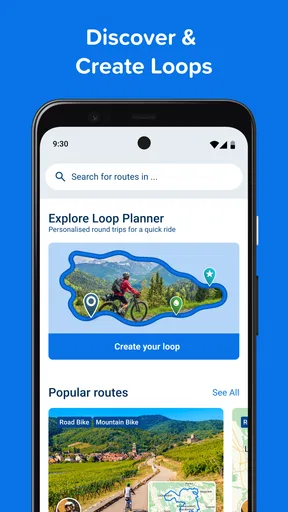
One of the first things I noticed about Bikemap is its impressive database of routes. With over 7 million routes worldwide, you're spoiled for choice. I decided to test it out by exploring some trails in my local area. The app's user-friendly interface made it easy to search by location, distance, and terrain type. I was pleasantly surprised to find some hidden gems I hadn't discovered before.
The route maps are detailed, offering insights into elevation changes and surface types, which is super handy for planning your ride. Plus, you can filter routes by popularity, allowing you to find tried-and-tested paths or explore less-traveled ones if you're feeling adventurous.
Real-Time GPS Navigation
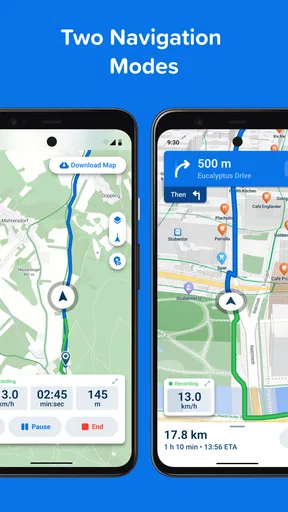
The GPS navigation feature is a game-changer. Once you select your route, the app provides real-time turn-by-turn navigation. I found this particularly useful in unfamiliar areas. The voice guidance ensures you can keep your eyes on the road while getting directions, making it a safer option for navigating complex routes.
Another cool feature is the offline maps. Before heading out, you can download the map, ensuring you're not left stranded if you lose mobile reception. This is a huge plus for those of us who love venturing into remote areas.
Track Your Performance
For those who love to track their progress, Bikemap offers comprehensive performance tracking. You can monitor your speed, distance, elevation gain, and even calories burned. The data is presented in an easy-to-read format, with graphs and charts to visualize your performance over time.
I found the in-depth analytics to be motivating. It's satisfying to see your improvements ride after ride, and it encourages you to push yourself further. Plus, the app syncs with popular fitness devices, so you can integrate your ride data with your overall fitness regime.
Community and Social Features
What makes Bikemap stand out is its vibrant community. You can connect with other cyclists, share your routes, and discover new ones from fellow riders. The social feed is a fun way to stay connected, share experiences, and even organize group rides.
There's also a feature that allows you to leave comments and rate routes. This is invaluable when planning new rides, as you can get insights from other cyclists about what to expect on a particular path.
Customization and User Experience
Personalization is key, and Bikemap doesn't disappoint. You can customize the app to suit your biking style, whether you're focused on road biking, mountain biking, or leisurely tours. The interface is intuitive, and the design is sleek, ensuring a smooth user experience.
Even the settings are easily adjustable, allowing you to tweak notifications, map styles, and more. This level of customization ensures that the app feels like it's tailored just for you.
Final Thoughts
Overall, Bikemap: Cycling Tracker & GPS is a must-have for anyone serious about cycling. It combines functionality with a user-friendly interface, making it an invaluable tool for both beginners and seasoned cyclists. With its extensive route database, real-time navigation, and performance tracking, it truly enhances the biking experience.
Whether you're looking to explore new routes, improve your performance, or connect with a community of like-minded cyclists, Bikemap has got you covered. So, grab your bike, download the app, and hit the road with confidence!
Making it part of a sensible routine
The version listed as 21.0.0 runs on Android 9 or later, and the app is rated for Everyone. It has been available since March 4, 2013, so it is an established cycling tool rather than a brand-new experiment. I would still check that my own device and preferred setup work comfortably before planning a ride around it.
One trade-off with a feature-rich cycling app is that there is more to decide than simply pressing start. I get better results when I make a few choices at home: pick the route, inspect its profile, download the map if needed, and decide whether I want navigation or just a recorded ride. That repeatable pre-ride routine reduces fiddling at the roadside and helps me notice when a route deserves a closer look.
For an ordinary evening, I might use it to find a loop that fits the time I have, save the route idea mentally or in my own routine, and start riding only after checking the surface and climbs. If a junction becomes confusing, I stop somewhere safe before checking the screen. That is a small habit, but it matters more than having extra information available while moving.
My overall view is positive, with one qualification: Bikemap is strongest when I treat it as a cycling planner and companion, not an unquestionable authority. Route variety, navigation, tracking, and rider input make it useful across casual exploring and regular rides. I would recommend trying it if discovering bike-friendly routes is part of the fun; if all I need is minimalist turn-by-turn directions or highly specialized training analysis, I would choose a tool built around that narrower job.
Pros
- Easy-to-use interface for all users.
- Accurate GPS tracking for routes.
- Large community for route sharing.
- Offline maps available for remote areas.
- Detailed elevation profiles provided.
Cons
- Limited free features without subscription.
- Battery drain during long rides.
- Occasional GPS signal loss issues.
- In-app ads can be intrusive.
- No real-time weather updates.
FAQs for Bikemap: Cycling Tracker & GPS
What features does Bikemap: Cycling Tracker & GPS offer for cyclists?
Bikemap provides a comprehensive suite of features for cyclists, including real-time GPS navigation, route planning, and access to a global database of cycling routes. It also offers offline maps for cycling without data, turn-by-turn voice navigation, and the ability to track your rides with detailed statistics. Integration with fitness devices and social sharing options enhance the experience.
Is Bikemap suitable for all types of cyclists, from beginners to professionals?
Yes, Bikemap is designed to cater to all levels of cyclists. Beginners will appreciate the user-friendly interface and curated routes, while experienced cyclists can take advantage of advanced features like elevation profiles and custom route creation. The app’s community-driven content ensures a diverse range of routes suitable for various skill levels.
Can I use Bikemap offline, and if so, how do I set it up?
Bikemap allows users to download maps for offline use, which is particularly useful in areas with poor network coverage. To set it up, simply select the desired region or route in the app and download it to your device. This ensures you have access to maps and navigation features even when you're offline.
How does Bikemap handle route planning and navigation?
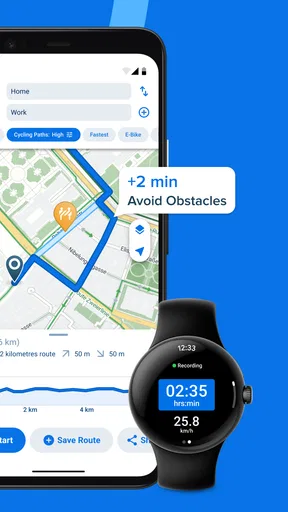
Bikemap offers intuitive route planning with options to customize your path based on distance, elevation, and terrain type. Once a route is selected, the app provides GPS-powered turn-by-turn navigation with voice guidance. Users can also view live elevation profiles and track their progress in real-time, enhancing both safety and convenience.
Is Bikemap free to use, and are there any premium features?
Bikemap is free to download and offers many features without charge. However, it also offers a premium subscription, Bikemap Premium, which unlocks additional features like offline maps, advanced routing options, and no ads. This subscription is ideal for avid cyclists seeking a more enhanced and uninterrupted experience.


